

What Does It Actually Cost to Run an LLM? See for Yourself
A free interactive cost calculator, a five-minute tutorial, and one model priced through five different doors.

I believe you learn more from seeing a thing once than from being told about it ten times. You can read any number of posts explaining that reasoning tokens are expensive or that caching saves money, and none of it sticks until you move a slider and watch the numbers change.
So I built a tool that lets you test LLM pricing interactively, and it is free.
The LLM Cost Calculator compares what a real workload costs across 10 models, from GLM-5.2, Claude Sonnet, Opus and Haiku to GPT-5.5, Gemini, Qwen and DeepSeek, and across every route to them: pay-per-token APIs, subscriptions and GPU self-hosting. Every price is pulled from the provider’s official pricing page, verified July 1, 2026. It is a learning tool, not a quote: the prices can be affected by other factors too e.g. the quality of prompts, agentic loops, actual reasoning effort, language etc.
The main purpose of the tool is to give feeling of how pricing changes based on the model, reasoning, caching, deployment type etc.

You can listen to how to use and interpret every box by clicking on the speaker icons:

How to use it
Step 1. Pick the model you are pricing. The selector marks each model as open-weight or closed-weight, and that istinction drives everything downstream. Open-weight models such as GLM-5.2 or DeepSeek can be rented on GPUs or re-hosted by third parties. Closed-weight models such as Claude or GPT-5.5 are only reachable through their maker’s API or an authorized cloud platform.
Step 2. Describe the work in units you know. No token math needed. Pick a task, news articles, chatbot conversations, email summaries, code reviews, support tickets or product descriptions, set a monthly volume, and the tool translates it into tokens and shows the arithmetic.
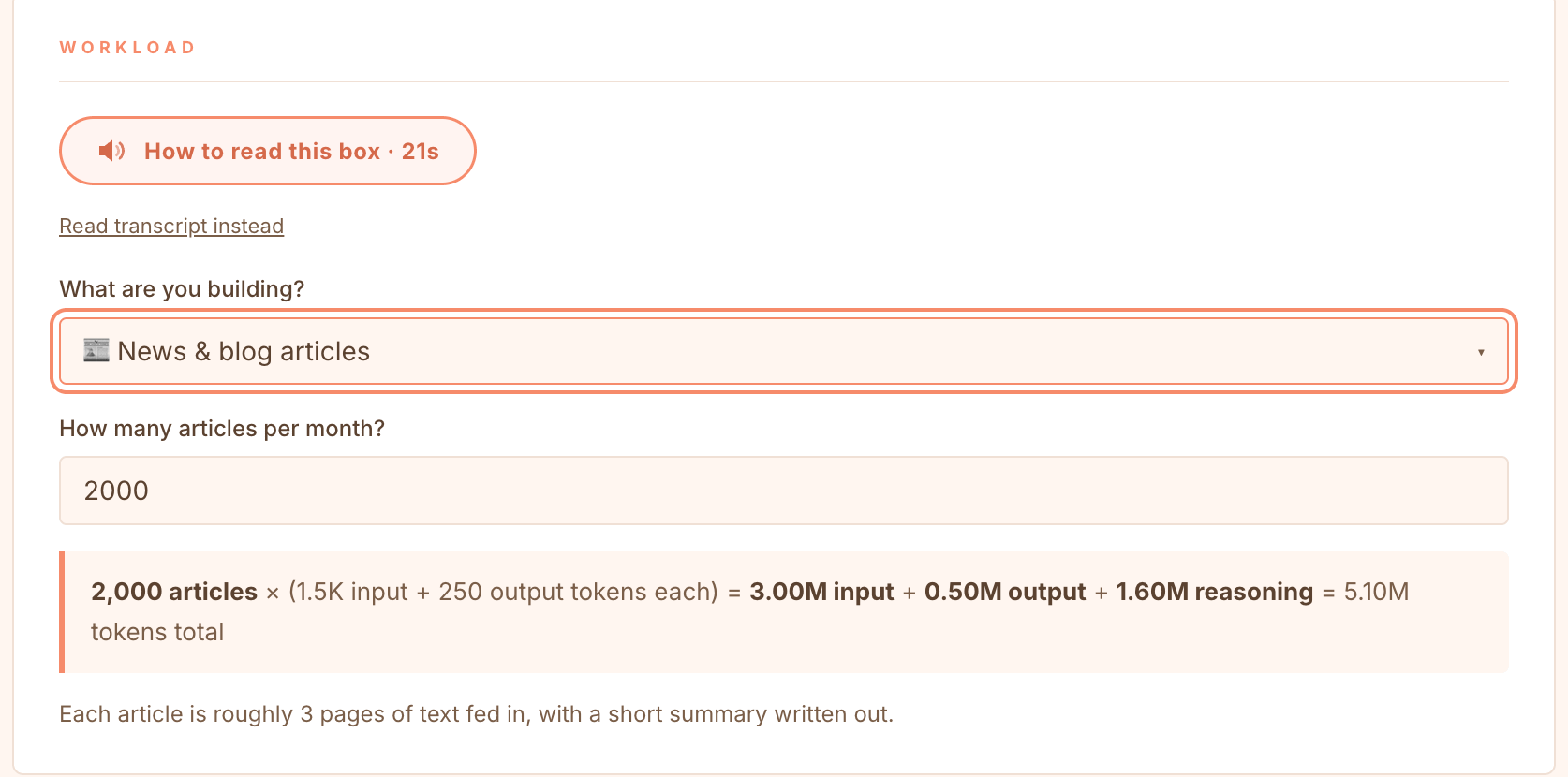
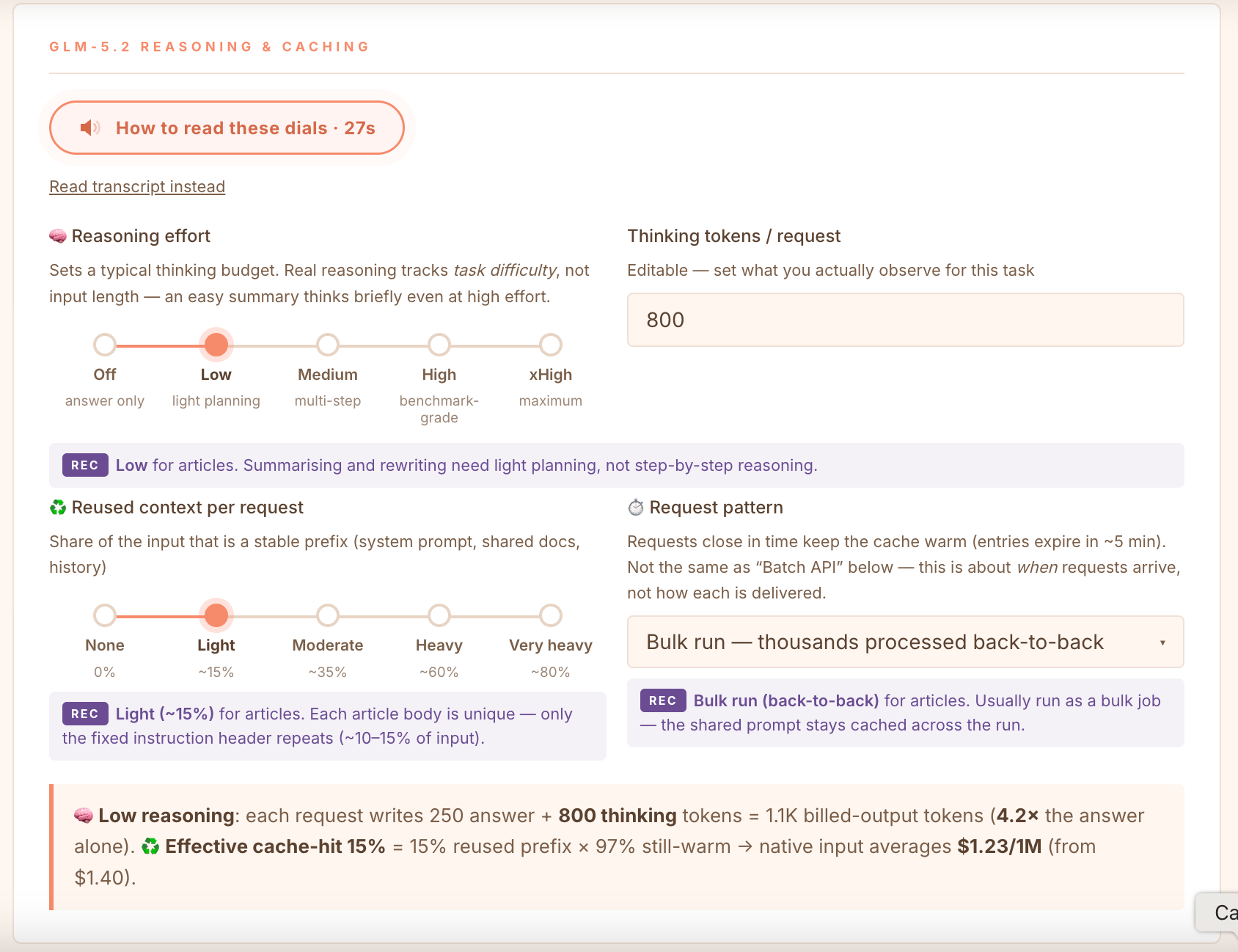
Step 3. Set the two important dials. Reasoning and caching. GLM-5.2 is a reasoning model, so reasoning tokens are billed at the output rate. Even at low effort, a 250-token summary bills around 1,050 output tokens, 4.2 times the visible answer. The caching dial models how much of your input is a stable prefix and how warm it stays between requests. Every control explains itself and recommends a setting for your task.
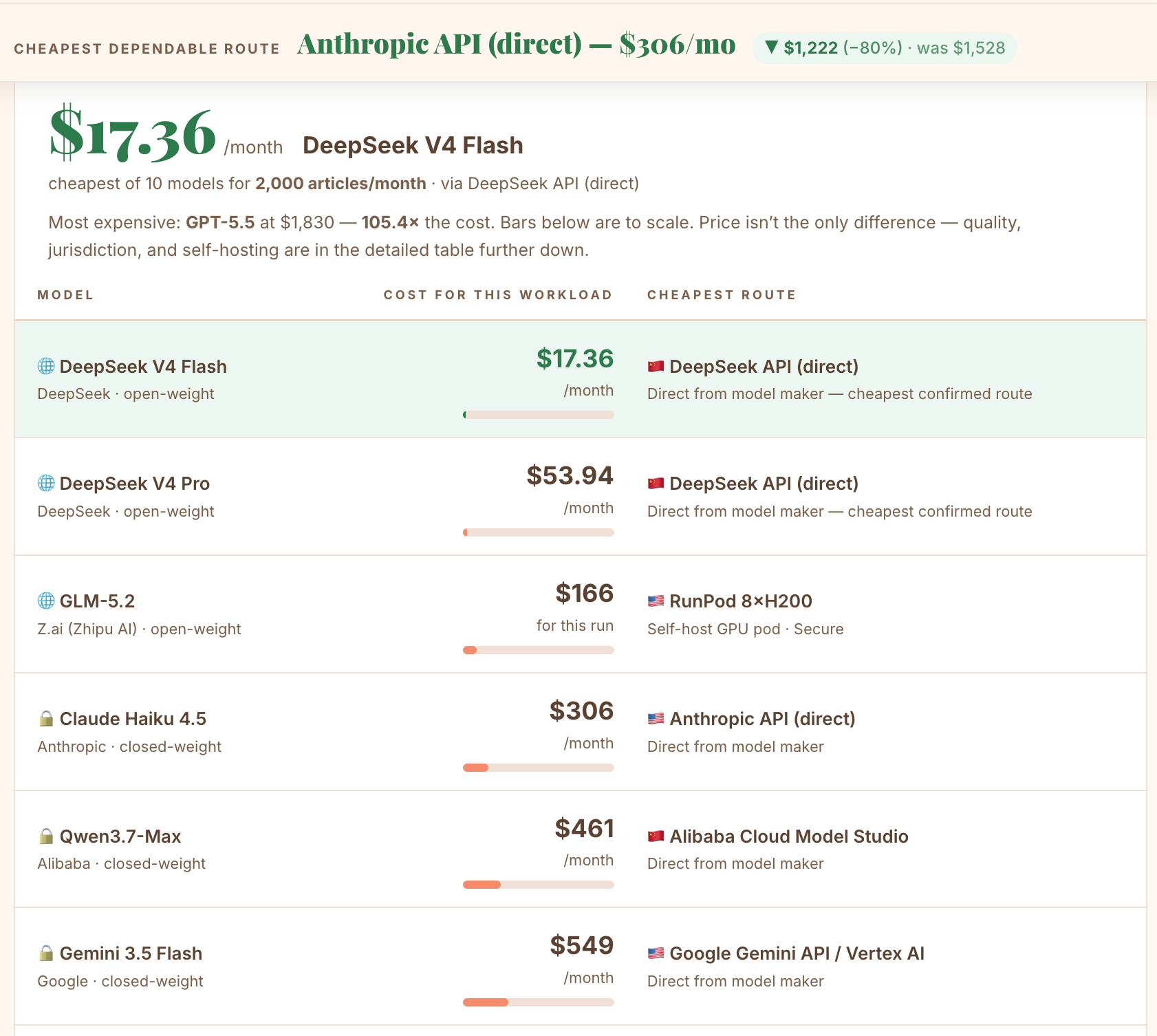
Step 4. Read the answer. You get a ranked provider table with the cheapest dependable route, a model-against-model comparison for the same workload, and a cost-versus-volume chart that shows where the ranking flips.
What it teaches you
The point of the tool is not the final number and to provide a quote, it is the levers. Each one is something you can act on this week:
Cut the reasoning budget first. In the default workload of 2,000 article summaries a month, 1.6M of the 5.1M billed tokens are thinking tokens. Matching reasoning effort to task difficulty is the single biggest saving.
Cache deliberately. Run jobs back to back so the shared prompt prefix stays warm. A cache hit on Z.ai costs $0.26 per million input tokens instead of $1.40.
Take the batch discount. Fireworks and Anthropic cut prices by 50% if you can wait up to 24 hours for results.
Distrust cheap aggregator prices. On OpenRouter, the cheapest GLM-5.2 hosts run FP4 quantization, which is a weaker copy of the model. Full quality costs about the same as going direct.
Distrust flat fees. A $20 Ollama subscription looks unbeatable until you check whether it can serve your volume and discover that the throughput and the quotas are not sufficient
Self-host later than you think. For the article processing workload, the break-even against a metered API sits around 3.8 million articles per month. Self-hosting is mostly worth it only when you have massive amounts of data to process.
One model, five doors
Here is the part worth seeing at least once. GLM-5.2 is open-weight, so the same model is reachable through five different doors, and the prices are not the same. For 2,000 article summaries a month, about 5.1M tokens, the calculator ranks them like this:
Z.ai native API (the model’s maker): $12.94, the cheapest dependable route.
Fireworks Serverless: $12.94, identical rates, US jurisdiction, managed infrastructure.
OpenRouter at full FP8 quality: $13.44. It adds failover across ~26 hosts, not savings.
Fireworks On-Demand GPU: $13.92 for the run, managed hardware with no cold-start billing (this only works if the summaries are sent as a batch)
RunPod 8×H200 self-host: $65.91, five times more, because you pay for eight minutes of weight loading and $52.50 of storage before the first token (this only works if the summaries are sent as a batch)
And a sixth door that is not one: Ollama Cloud at $20 or $100 a month is flagged as not dependable. GLM-5.2 is not even confirmed in Ollama’s catalog, so its subscription price cannot be trusted as “cheapest”.
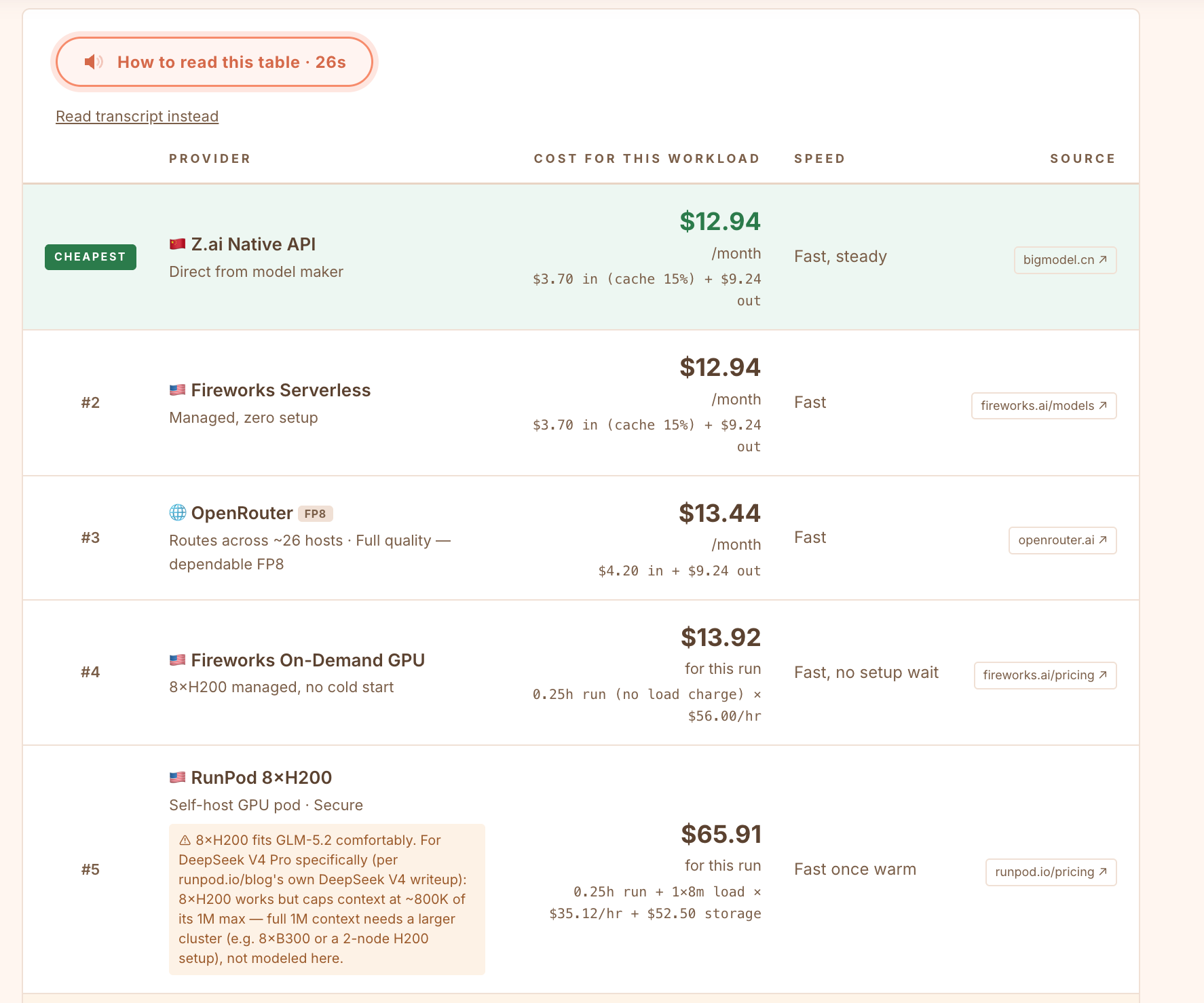
Same weights, a fivefold price spread, and the cheapest-looking one is the one route that cannot be trusted. Now drag the volume slider up and watch the ranking flip: above roughly 3500 articles as one batch, the self-hosted pod starts to win.
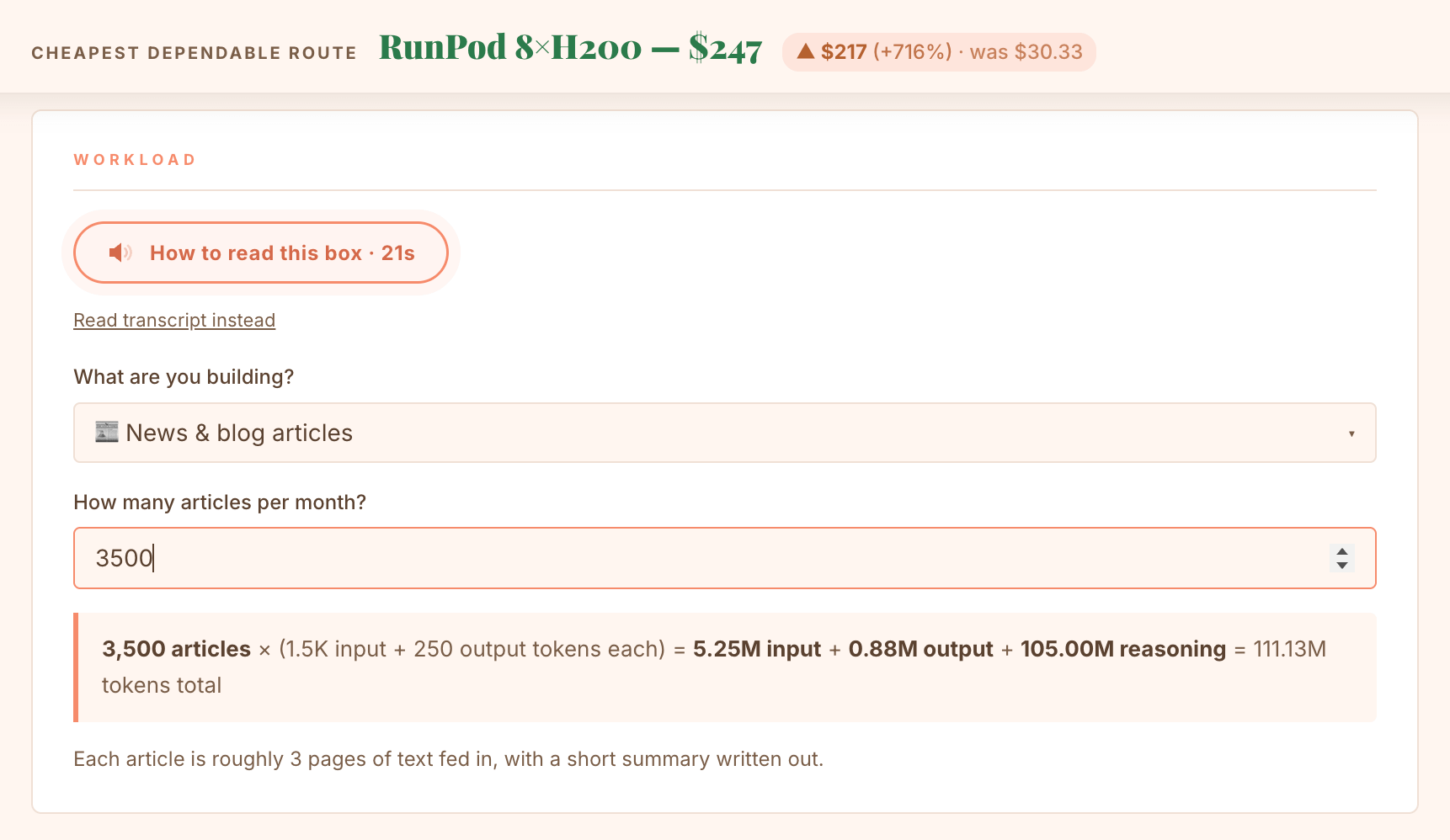
For comparison, the same workload on Claude Sonnet 4.6 costs $1,604 and on GPT-5.5 it reaches $3,203, while on DeepSeek Flash it is only $30.38.
Yet, remember, we are talking here only about the price and not quality. Other trade-offs are discussed in detail in the workshop.
Where the tool comes from
The calculator is one tool from the workspace of Learn to Optimise Your AI Stack, a hands-on workshop on Thursday 30 July 2026, 17:00 to 20:00 CEST. Teams audit a real AI stack and work through four challenges:
cutting a coding-tool budget by 40 to 60 percent
taming a company assistant that burns budget as fast as it gets adopted
rescuing a product whose API bill went from $10 to $100 per unit of work
redesigning a multi-agent workflow that burnt half a year’s AI budget in five days.
Participants keep the workshop workspace afterwards, including the full version of this calculator with more models and providers, and the additional tools being built for the session. The workshop costs €150 per participant and is limited to 20 seats with only 9 seats available. Register here.
If a number in the tool surprises you, good. That is what seeing once does.
Paid AI Realist Subscribers get 20% discount. Promo code is below the paywall.
This article was drafted with the help of AI (Claude). The structure, the numbers and every claim were reviewed and verified by me against the calculator’s live output and the providers’ official pricing pages. The tone, the opinions and any remaining mistakes are mine.
Upgrade your subscription here: